
Our AI fraud watch reads our company email for bank detail scams and hacked mailboxes. Simple fixed rules pick out the emails that mention money, bank details or logins, about one in nine, and only those go to our AI engine, which runs in the cloud. Everything else never leaves Microsoft 365. Even so, I wanted to know whether we could keep the whole job in the building. We already own an AI server, so I tested it.
The machine and the model
The server is the Dell Precision tower I wrote about in we spent £5,000 on our own AI server, with two NVIDIA graphics cards and 40 GB of graphics memory between them. It runs gpt-oss, OpenAI's open model, in its 20 billion parameter size, which is the largest version that fits. It already does some jobs for us, and it is reachable from our web server over a private network, so swapping it in would have been a small change.
How we tested it
A fair test needs real work, not made-up examples. We took the 344 emails the fraud watch had already picked out and rated in its first weeks, and gave every one to our own server with exactly the same instructions the cloud AI gets, eight emails at a time, just as the fraud watch sends them. Then we compared its ratings of fine, suspicious and danger with the ratings the cloud AI had given.
One thing worked against our server. The fraud watch only keeps a short extract of each email, about 600 characters, so that is all our server saw. The cloud AI had seen up to 3,000 characters when it rated them. I will come back to that.
What it got right
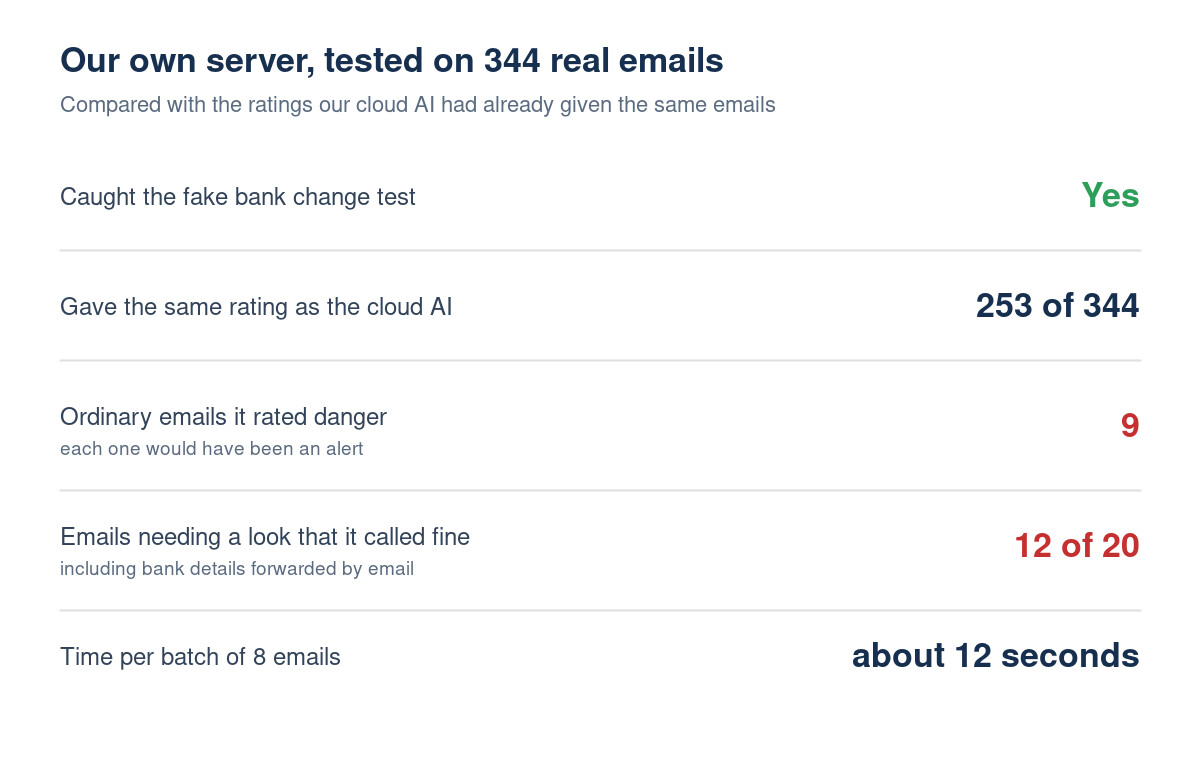
It caught the one that mattered most. I had tested the fraud watch by sending a fake "our bank details have changed" email from my own mailbox, telling the reader to pay a stranger and not to call. Our server rated it danger, just as the cloud AI had. It was quick, too: about 12 seconds for each batch of eight, which is fine for a job that runs every fifteen minutes.
Where it fell short
Too many false alarms. It rated 9 ordinary emails as danger. Every one would have sent me an alert and put a warning in front of everyone in the office. They were the sort of email every business gets: invoice notices from Microsoft, an HMRC reminder about money laundering supervision, tax detail requests from Revolut, an account confirmation from a supplier's forum and a statement from our own accounts software. All came from the companies' real addresses and the cloud AI had rated them fine. That is about one false alarm every two days. People soon learn to ignore a warning that cries wolf, and then the real one gets ignored too.
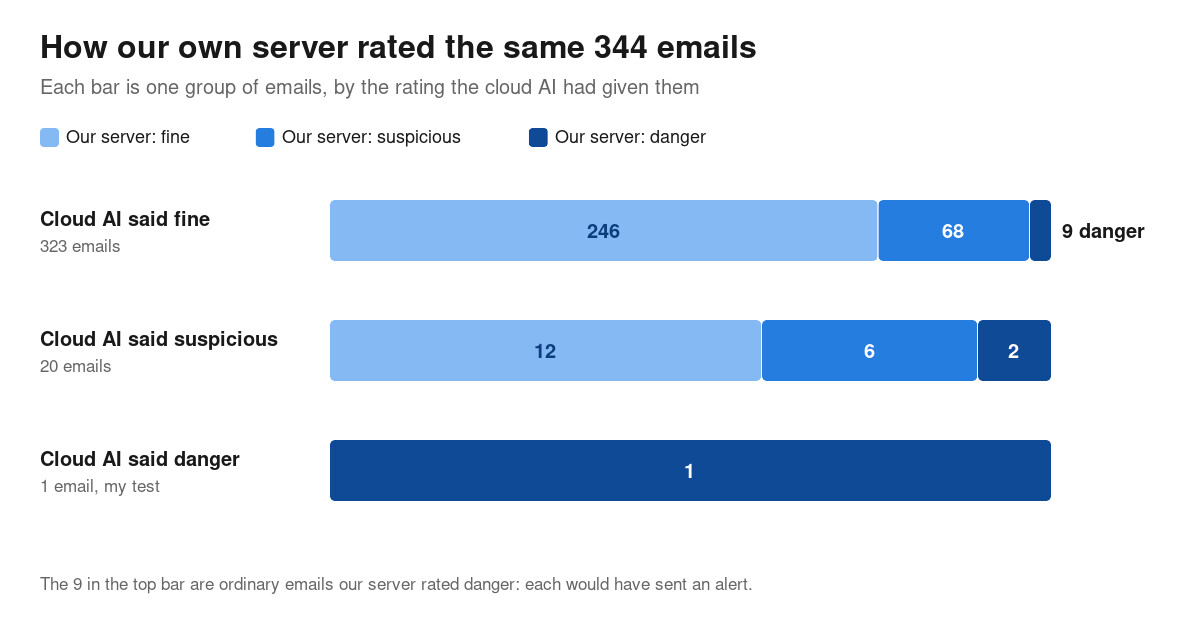
It let through the ones that need a look. Of the 20 emails the cloud AI had marked suspicious, our server called 12 fine. The one that worried me was a forwarded email from a debt collector with bank details for paying a small bill. It probably was genuine, but bank details arriving by email are exactly what our rule says to check by phone, and our server called it "legitimate". A fraud checker that waves through bank details is missing the point.
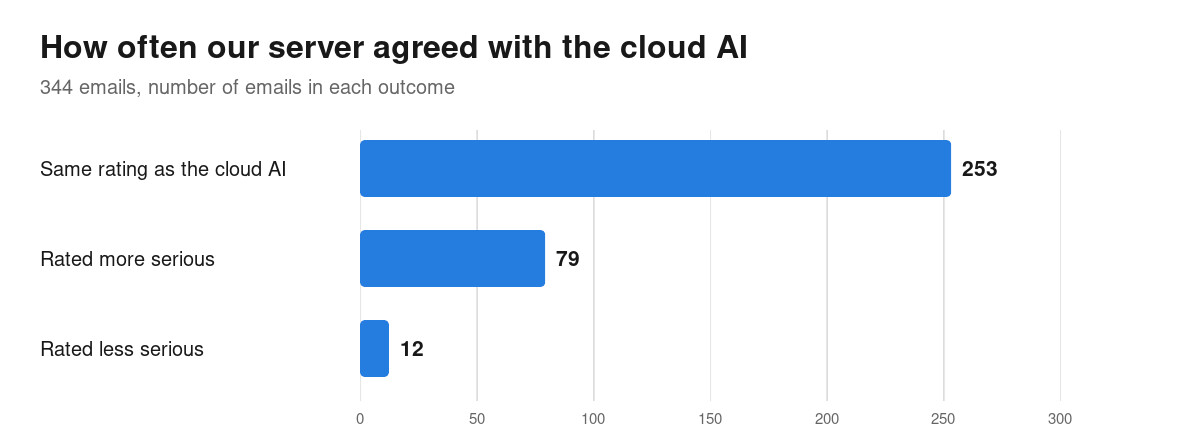
Overall it gave the same rating as the cloud AI on 253 of the 344 emails. That sounds respectable until you remember most of them were easy.
Your situation may be slightly different. ask a question below ↓ and our editorial team will reply with our advice.
Was the test fair?
Not completely, and I would rather say so. Our server saw shorter extracts, and more of each email might have helped it. A fairer rerun would fetch the full emails again. I have not done that yet because the result matches what we found when we tested the same server against the cloud AI on a completely different job, writing astrology readings, in can an AI on our own server match a cloud model. In both tests the smaller model that fits our machine fell clearly short, and the bigger open models that closed the gap need far more memory than we have.
The comparison also treats the cloud AI's ratings as the yardstick. They are not perfect either. But when our server disagreed, it was mostly by raising alarms about genuine emails or relaxing about bank details, and both of those are the wrong way round for a fraud checker.
What we decided
We kept the cloud AI for the fraud watch. Keeping everything in the building would be nice, but not at the price of a warning system that alerts on Microsoft invoices and shrugs at bank details. The privacy side was already mostly solved by the design: fixed rules on our own server decide which emails go to the AI at all, so most of our email never goes anywhere. Since this test we have gone further: the emails that do go to the AI are anonymised first, with names, addresses, phone numbers and bank details swapped for tokens and put back afterwards. The ratings came out almost exactly the same. How it works is in how we anonymise emails before our AI reads them.
I will test again when a bigger model fits our hardware, or when we upgrade the hardware. It would be a small change if the results were good enough.
What I would tell any small business
- Test on your own real work. 344 of our own emails told us more than any benchmark could.
- Look at the kind of mistakes, not just the score. Agreeing on three quarters of emails sounds fine. Nine false alarms and a missed bank detail email do not.
- Reduce what goes to the cloud before trying to remove it. Filtering with simple rules first meant only about one email in nine ever needed an AI, and anonymising those means the AI sees the wording, not the personal details.
- Say where your test was unfair. It stops you fooling yourself either way.



Ask Technology for Small Business a question
Ask our editorial team a question and we will reply with our advice. Tell us as much about your situation as you can: the more detail you give, the more useful our answer can be.
You do not need to use your real name. Please do not include your full address, phone number, email address, or the names of other people. We may edit or remove identifying details for privacy and legal reasons.
Comments are moderated before publication.