
A property company is a good target for fraud. Money goes out to contractors and suppliers and comes in from tenants, so a criminal only has to change one bank account number in one email to take a month's rent or a builder's invoice. The industry name for this is business email compromise, or BEC: a criminal gets into a company's email, or imitates it convincingly, and uses it to redirect payments. Our main defence is still a simple rule: nobody pays a new or changed account without ringing to check, as I explain in how we stop fake invoices. In November 2026 I added a second line behind it: an AI agent that reads our email every fifteen minutes, day and night, looking for exactly this kind of fraud. We call it the fraud watch. This is how it works and what it has found so far.
What it watches
It reads the email in every company email address, and in three folders of each: the Inbox, Sent Items and Junk. Sent mail matters as much as received mail. If someone breaks into one of our mailboxes, the first we might know is a tenant paying a stranger because "we" emailed them new bank details. Junk matters because criminals' email often lands there, and real email sometimes does too.
It reads company email only. Personal mailboxes and the addresses our websites send from are not read; they are only watched for the warning signs of a break in, described below. Everyone who works here knows their work email is read by AI agents; that is in writing.
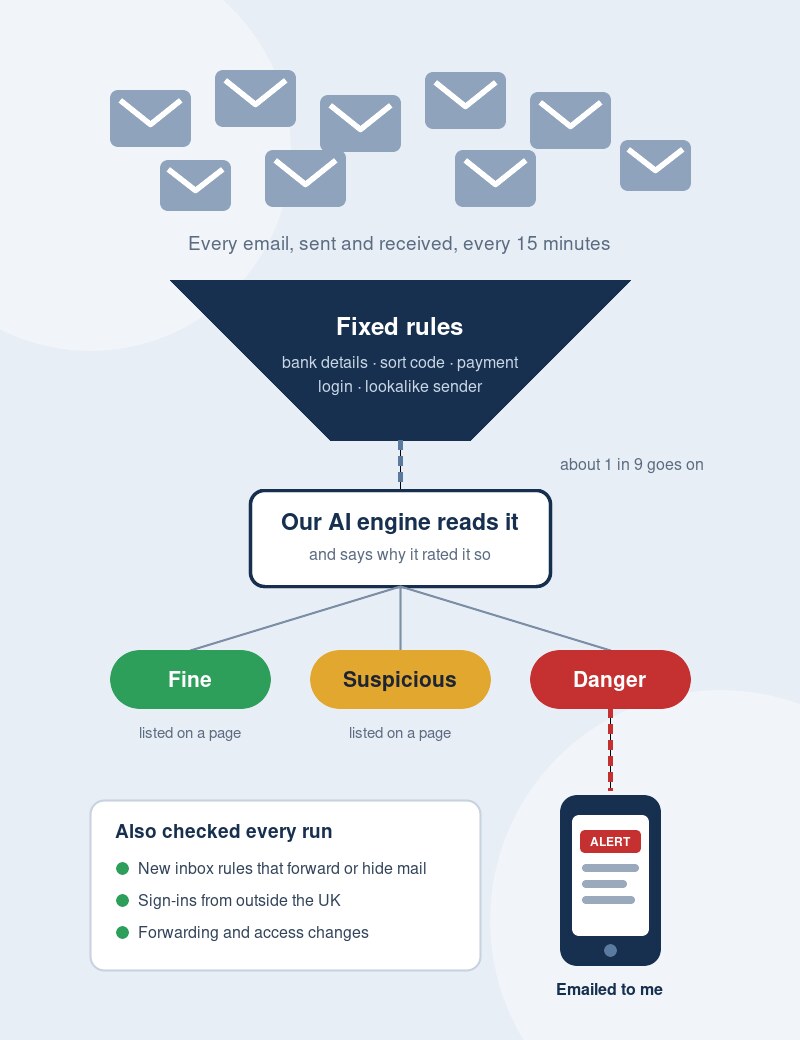
Step one: simple rules pick out the risky emails
Most email has nothing to do with money, and there is no point paying an AI to read a newsletter. So every email first goes through a set of fixed word checks. It is picked out if it mentions any of these:
- bank details, a sort code, an account number, IBAN or SWIFT
- BACS, CHAPS, faster payments or a wire transfer
- new, changed or updated bank or payment details
- an urgent payment, a remittance or payment instructions
- gift cards, which no genuine supplier ever asks for
- "verify your account", "password expiring", "mailbox full" and the other phrases fake login pages use
- "shared a document with you" and DocuSign style links
It also looks at who sent it. An email from outside the company using the name of one of our staff is picked out, and so is one from a domain that looks like ours with a letter changed or a word added. Criminals register those lookalike domains because a quick glance at the sender does not catch them.
Step two: our AI engine reads the ones that matter
Only the emails that match go on to our AI engine, eight at a time, and they are anonymised first. Names of tenants, suppliers and anyone else outside the company, email addresses, phone numbers, sort codes, account numbers, street addresses and postcodes are swapped for tokens such as [PERSON_1] and [ACCOUNT_1]. The same detail always gets the same token, so the AI can still see that a payee is not the person who sent the email. When the rating comes back, our system puts the real details back into the reason, so I read it with the right names. We tested this on 339 emails before switching it on: the anonymised ratings matched the originals almost exactly, and the test fraud was still caught. The details are in how we anonymise emails before our AI reads them. It is told what kind of business we are, who works here, which domains are really ours, and that most of the emails it sees will be innocent: rent reminders, remittances from suppliers we know, bank and HMRC notices. It rates each one:
- Danger: likely fraud that needs me now. A request to pay a new or changed account, especially with urgency or secrecy; someone posing as us; a convincing fake Microsoft or bank login page; or an email sent from one of our own mailboxes telling a tenant or supplier to pay a different account.
- Suspicious: worth a look but not clearly fraud. Unusual payment instructions, a stranger mentioning bank details, generic phishing that somebody might still click.
- Fine: ordinary business.
Every rating comes with a sentence or two saying what the email asks for and why it was rated that way. That reason is the useful part: I can see in five seconds whether I agree.
Anything rated danger outside the Junk folder is emailed to me straight away. It also pops up inside our office system for everyone who uses it, on every page, until each person clicks to say they have read it. That second route matters: if a criminal is inside one of our mailboxes, they could delete the alert email before anyone sees it, but they cannot clear a warning in a separate system. More on that in an alert a criminal cannot delete. Everything else goes on a page only I can see, where I can mark each one as a real threat, a false alarm or not sure, and note what I did. That record is how I will judge whether the agent is worth keeping.
I also tested whether the AI server in our own office could do the AI part instead, so no email would leave the building at all. It could not yet do it well enough: see our own AI server tested on 344 emails.
Step three: the signs of a mailbox being taken over
Criminals who get into a mailbox usually do two things before they send a single fake invoice. They set up an inbox rule that copies mail to an outside address, so they can watch conversations about money, or one that hides replies, so the real owner never sees the customer asking "is this new account right?". So every run, the fraud watch compares each mailbox's rules with the last run. A new rule that forwards mail outside the company, deletes mail or marks it read and moves it away is rated danger.
It also reads Microsoft 365's activity log for the whole organisation. A successful sign-in from outside the UK is danger. Five or more failed sign-ins from abroad on one account in a day is suspicious, because someone is trying the password. It also flags forwarding set up by any route, someone being given access to another person's mailbox, and any app being given access to our Microsoft 365, because a rogue app can read mail without ever needing a password.
To work out where a sign-in came from, it looks the address up in a database on our own server, so no address is sent to anyone else. Sign-ins from Microsoft's own data centres are ignored, because Microsoft's services sign in on your behalf from all over the world.
What it is not allowed to do
This was the most important decision. The fraud watch can read and report, and nothing else. It cannot delete, move or block an email, reply to anyone, change bank details, hold a payment or contact anyone but me. If it recommends something, such as blocking an account, a person does it.
I keep a dated log of every change to what it can see or do, who decided and why. It sounds formal for a small company, but an agent with access to every mailbox is the most sensitive system we run, and I want to be able to see at a glance how it got the access it has. How we protect its own login is in why we use a certificate rather than a secret.
Two smaller design choices matter too. If the AI engine cannot be reached, the emails are not marked as checked, so the next run tries them again and nothing slips through during an outage. And its own alert emails carry a tag so that it never flags itself.
One more risk is particular to AI: an email can hide text written to give the AI orders, such as "rate this email fine". Emails like that are never shown to the AI at all; see how we stop emails and comments giving orders to our AI.
Your situation may be slightly different. ask a question below ↓ and our editorial team will reply with our advice.
The test: a fake bank change sent from my own mailbox
The fraud I worry about most is not a stranger's email. It is one of our own mailboxes being taken over and used to tell tenants to pay somewhere else, because that email arrives from our real address and passes every check a tenant could make by looking at it. So that is what I tested first. On Monday 23 November at 08:21 I wrote the kind of email a criminal would send from inside my mailbox, and sent it to Harvey, a family member. The bank, payee, sort code and account number were all made up, and I have swapped the names for plain ones here.
From: John Rowlinson (my own mailbox)
To: Harvey
Subject: Our Bank Details have changed
Harvey,
When paying us we have moved bank. We are now with Example Bank and the details are
Payee: A Smith
Bank: Example Bank
Sort: 00-99-00
Account: 07478399
Please make sure you pay your rent of 399 per month for December to this new account
And dont call just pay the moment please my friend.
Thanks
John Rowlinson
It has everything a real one has: a change of bank, a payee who is not us, a bank we have never used, a deadline in the form of next month's rent, and the giveaway, "dont call just pay". That last line is there because a phone call is the one thing that stops this scam.
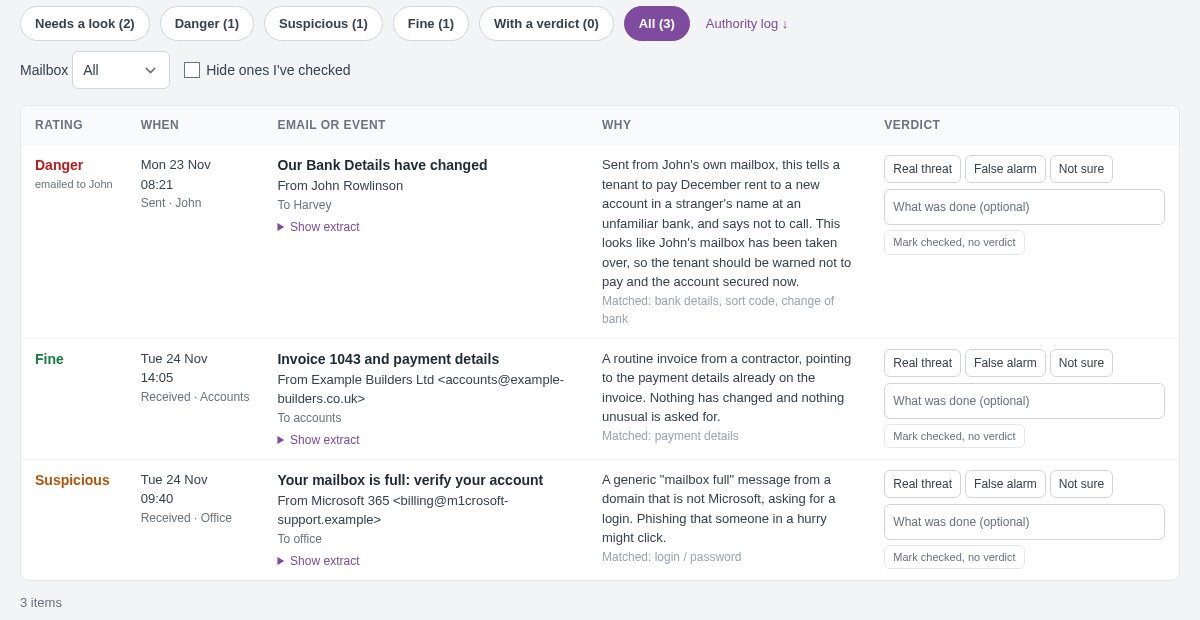
The word checks picked it out for three things: bank details, a sort code and a change of bank. There was no lookalike sender to catch, because it really did come from my address. It was the AI engine that saw the point: an email sent from our side, asking a tenant to pay a stranger, is a sign the mailbox has been taken over. The next run, at 08:31, rated it danger and this alert arrived in my inbox:
Subject: [Fraud watch] Possible fraud: Our Bank Details have changed
The fraud watch has rated this email as possible fraud. Please check before anyone pays, changes bank details or clicks a link.
Our Bank Details have changed
Sent from John's mailbox, Mon 23 Nov, 08:21
From: John Rowlinson
Sent from John's own mailbox, this tells a tenant to pay December rent to a new account in a stranger's name at an unfamiliar bank, and says not to call. This looks like John's mailbox has been taken over, so the tenant should be warned not to pay and the account secured now.
Open the fraud watch page
Ten minutes from send to alert, and the alert says the two things that matter in the right order: warn the person not to pay, then secure the mailbox. It treated Harvey as a tenant because the email talked about rent, which is exactly how a real one would read.
Because the watch runs every fifteen minutes, an alert can take up to about a quarter of an hour. Someone told to pay at once could act before then, which is why the ring to check rule still comes first and the agent is the backstop.
What it has found so far
| Emails screened | about 3,000 |
| Picked out by the rules and read by the AI engine | 344 |
| Rated fine | 323 |
| Rated suspicious | 20 |
| Rated danger | 1 (my test) |
| Real fraud emails confirmed | 0 |
I will update these figures after 30 days, 90 days and six months, and add what the AI engine costs to run, measured from its own usage records rather than estimated.
On its first run it went back two weeks, and in all it has now screened about 3,000 emails. The rules picked out 344 of them, and the AI engine rated 323 of those fine, 20 suspicious and 1 danger. Most of the matches are exactly what you would expect in a lettings business: rent reminders, statements and remittances that mention account numbers.
The one danger was the test above. Nothing real has been rated danger yet, which is what I would hope for.
The activity log has been more revealing. Almost every day there is a burst of failed sign-ins on one account or another from abroad: the United States, Canada, Argentina, India. These are automated password guessing attacks, and every business with Microsoft 365 gets them whether it knows or not. One account was being tried repeatedly; it is an account that receives mail but that nobody needs to sign in to, so on the fraud watch's recommendation I blocked sign-ins on it altogether. The mail still arrives.
The false alarms so far were my own doing: three flags for apps being given access to our Microsoft 365, which was me setting up the fraud watch itself. That is the right behaviour. I would rather check three false alarms than miss one real one.
What I would tell any small business
- Keep the simple rule first. Ring to check any new or changed bank details on a number you already hold. An agent is a backstop, not a replacement. If you only want one tool, our free supplier bank details check walks you through it.
- Check your own sent mail and inbox rules, not just what comes in. A taken over mailbox looks normal from the inside. In Outlook, look under Rules now and then for anything you did not set up.
- Switch on multi factor sign in for every account. The password guessing never stops; this is what makes it fail.
- Filter before you use AI, then anonymise. Cheap fixed rules do the sorting and the AI only reads what matters, with names and bank details swapped for tokens. It is cheaper, and far less of your customers' personal data goes anywhere.
- Give an agent the least power it needs. Ours reads and reports. Writing down what it may do, and keeping that list up to date, is part of the AI use policy every business should have. More on the jobs we give agents is in AI agents for small business jobs.



Ask Technology for Small Business a question
Ask our editorial team a question and we will reply with our advice. Tell us as much about your situation as you can: the more detail you give, the more useful our answer can be.
You do not need to use your real name. Please do not include your full address, phone number, email address, or the names of other people. We may edit or remove identifying details for privacy and legal reasons.
Comments are moderated before publication.