
Our AI fraud watch reads our company email every fifteen minutes and emails me when it finds something dangerous, such as a request to pay a new bank account. A few days after it went live I realised there was a hole in that. The danger it watches for most is one of our own mailboxes being taken over. And if a criminal is inside a mailbox, the first thing they can do is delete the email warning about them.
The problem with email alerts about email
When a criminal gets into a business mailbox, they usually want to stay unnoticed for as long as possible. They set up rules that hide replies, and they delete anything that might give them away. An alert sent by email lands in exactly the place they control. If the mailbox they are in is mine, my fraud warning could be gone before I ever see it.
The same idea applies well beyond AI. If you only ever hear about a problem through the system that has the problem, you may not hear about it at all. Banks text you about a suspicious card payment rather than emailing you for the same reason.
The fix: a warning in a separate system
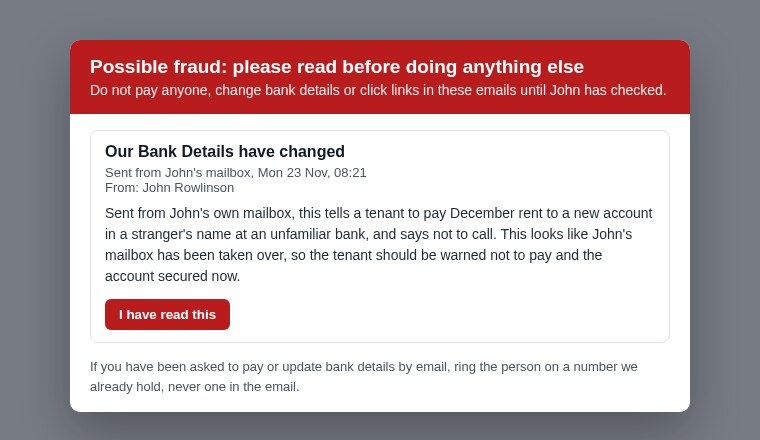
We run our property company on a system I built ourselves, which everyone in the office signs in to every day. It has nothing to do with Microsoft 365, so a criminal in a mailbox cannot touch it. Now, whenever the fraud watch rates something as danger, a warning pops up in that system for every person who uses it, on every page, as well as the email to me.
How it works
- Everyone sees it. Every signed-in user gets the pop-up, whatever page they are on. Pages that are already open check every minute, so it appears without anyone refreshing.
- It says what to do first. The heading tells people not to pay anyone, change bank details or click links until I have checked. Underneath is the rule we always follow: ring the person on a number we already hold, never one in the email.
- It shows enough, not everything. Staff see the subject, which mailbox it was in, when, who it was from and why it was rated danger. They do not see the email itself, which may be in someone else's mailbox.
- Each person has to confirm it. The warning stays until each person clicks "I have read this", and the system records who confirmed and when. One person closing it does not close it for everyone.
- It does not hang around for ever. It disappears after seven days, or as soon as I mark it a false alarm on the fraud watch page. If I mark it a real threat, anyone who has not yet confirmed still sees it.
- Junk is left out. Phishing that Microsoft has already put in the Junk folder goes on the review page but does not pop up, so real warnings are not buried.
Your situation may be slightly different. ask a question below ↓ and our editorial team will reply with our advice.
Why it only went in after the system was live
I did not think of it when I built the fraud watch. It came up when I was looking at the alert email and asked myself who else would know if I never saw it. That is the honest way most security improvements happen in a small business: you build something, use it, and then notice the gap. What matters is writing the change down. The fraud watch keeps a dated log of every change to what it may do and who it tells, and this went in with the reason: a criminal in a mailbox could delete the alert email, but cannot clear a warning in a separate system.
I tested it with a made-up alert before switching it on. It appeared for a user, disappeared once they confirmed it, and stayed for everyone else.
What I would tell any small business
- Ask where your alerts go. If a warning about a hacked mailbox is sent to that mailbox, it can be deleted. Send serious alerts somewhere else as well: a different system, a text message, or a phone that is not signed in to the same account.
- Tell everyone, not just the boss. Fraud usually succeeds through whoever happens to be processing the payment that day. They need the warning as much as you do.
- Put the safe action in the warning itself. "Do not pay, ring on a number you already hold" is more useful than any amount of technical detail.
- Write down why you changed it. A short log of what your security tools may do, and why, is easy to keep and very useful later. It is part of a good AI use policy.



Ask Technology for Small Business a question
Ask our editorial team a question and we will reply with our advice. Tell us as much about your situation as you can: the more detail you give, the more useful our answer can be.
You do not need to use your real name. Please do not include your full address, phone number, email address, or the names of other people. We may edit or remove identifying details for privacy and legal reasons.
Comments are moderated before publication.