
I have built online payments into two very different websites this year. Explore Astrology sells personal astrology reports, delivered as a PDF, to people all over the world. The other is a booking system I built for a clay shooting ground, where customers book a day out and pay a deposit in pounds. One uses Stripe and the other uses PayPal. I have built both into both, so this is not a comparison from the brochures. It is what each was like to build and run, and why each website ended up with the one it has.
The short answer
- Stripe suits selling to the public online, especially digital products to buyers in other countries. It handles prices in many currencies, Apple Pay and Google Pay, and, through its managed payments service, the sales tax and VAT rules of other countries.
- PayPal suits taking a simple payment in pounds from customers who already have a PayPal account, or who are happier paying through a name they know. For a single deposit it is simpler to set up.
Stripe on Explore Astrology
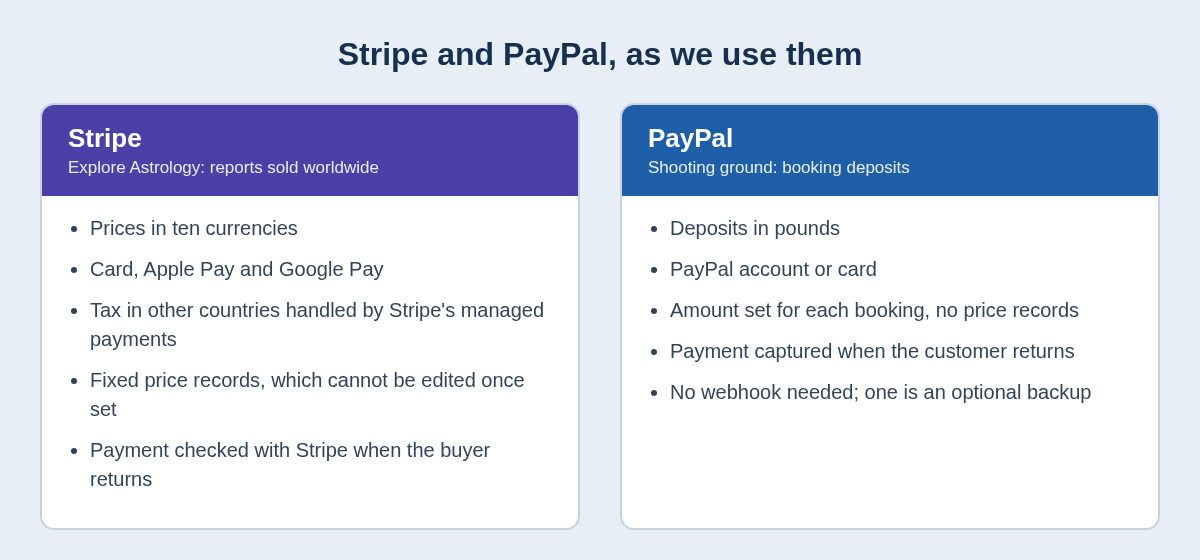
The reports cost £3.99 in the UK, with prices in ten currencies for buyers elsewhere: dollars, euros, rupees and so on. Selling a digital product to consumers abroad brings a problem most small businesses do not think about until it is too late. Many countries expect the seller to charge their own sales tax or VAT on digital goods. Registering for those yourself would be absurd for a £3.99 product.
Stripe's managed payments service solves that. Stripe acts as the seller of record and deals with the tax in each country. For a small digital product sold worldwide, that on its own makes Stripe the right choice. The buyer pays on a payment page hosted by Stripe, so no card details ever touch our server, and they can use a card, Apple Pay or Google Pay.
What I learned building it:
- Tell Stripe the currency, every time. When we added local prices, our page showed a price in dollars but the payment page charged pounds, because Stripe was guessing the buyer's currency from its own idea of where they were. Passing the currency with each payment fixed it.
- Prices cannot be edited once set. In Stripe a price is a fixed record. When we lowered the price in one country, Stripe would not let us change the amount for that currency; we had to create new prices and switch the website over to them.
- Check the payment with Stripe, do not trust the browser. When a buyer comes back from the payment page, our server asks Stripe whether that payment really went through before it delivers anything. Anyone can type a web address; only Stripe can say a payment was made.
- The payment page carries Stripe's branding as well as yours. Because Stripe is the seller of record, its payment network's name and terms appear on the payment page beside ours. It is worth looking at your own payment page through a customer's eyes and asking whether an unfamiliar name might make them hesitate.
PayPal on the shooting ground
The booking system works differently. The office confirms a booking and sends the customer an email asking for the deposit, with a secure link. The customer pays on PayPal's own pages, either with their PayPal account or with a card, and comes back to the booking system. Deposits can still be recorded by hand for cash, card machine or bank transfer, so PayPal is one way to pay, not the only one.
What I learned building it:
- The amount is set for each payment. There are no price records to manage. Each booking's deposit is worked out by the booking system and sent to PayPal with the order, which suits a business where every booking is different.
- No webhook needed. With PayPal's checkout, the payment is approved on PayPal's site and then captured by our system when the customer returns. That is the moment the money is taken, so we know straight away whether it worked, and record it and tell the office there and then. A webhook, PayPal calling our server separately, is set up only as an optional backup.
- Test against the sandbox first. PayPal has a separate test system with pretend accounts and pretend money, and the booking system can be pointed at it with one setting. Use it before you take a real customer's money.
- Small details catch you out. PayPal rejected our request to take the payment because it contained an empty list where it expected nothing at all. The fix was one line, but finding it took longer than anything else in the job. Every payment service has quirks like this, and they only show up when you build it.
Your situation may be slightly different. ask a question below ↓ and our editorial team will reply with our advice.
We built Stripe for the shooting ground too
The booking system can use either. Stripe was written first, and switching between the two is one setting. Stripe needed a webhook to be set up before it could work: Stripe calls a page on our site when a payment completes, with a signature our server checks. That is the right way to build it and it is more robust, but it is one more thing to set up and keep working. For deposits in pounds from local customers, PayPal's capture on return was simpler, and plenty of customers would rather pay with an account they already have.
Which should you use?
- Selling digital products to people in other countries: Stripe, and look hard at its managed payments service for the tax. That alone can decide it.
- Taking deposits or one-off payments in pounds: either works. PayPal is quicker to get going and familiar to customers; Stripe is more flexible if you will build more later.
- Not sure: offer both if your system allows it. Ours does, and it costs little to keep the second one ready.
- Fees: compare both companies' current fee pages for your own type of sale. Fees differ by card type, country and extras such as managed payments, and they change, so any figure I gave here would soon be out of date.
Whichever you choose, use the hosted payment page rather than taking card details on your own website. It keeps card numbers off your server entirely, which is safer for you and your customers. If you are building the website itself, Laravel or WordPress covers the other big choice.



Ask Technology for Small Business a question
Ask our editorial team a question and we will reply with our advice. Tell us as much about your situation as you can: the more detail you give, the more useful our answer can be.
You do not need to use your real name. Please do not include your full address, phone number, email address, or the names of other people. We may edit or remove identifying details for privacy and legal reasons.
Comments are moderated before publication.